In solo, you play both sides yourself, one after the other. It is the best way to discover a scenario, try a tactic or check a rule, with no opponent and no pressure. For how to play a turn (shooting, movement, combat), see the Against the AI tutorial: it is exactly the same screen. The screenshots come from the French version of the site.
1. Create the game
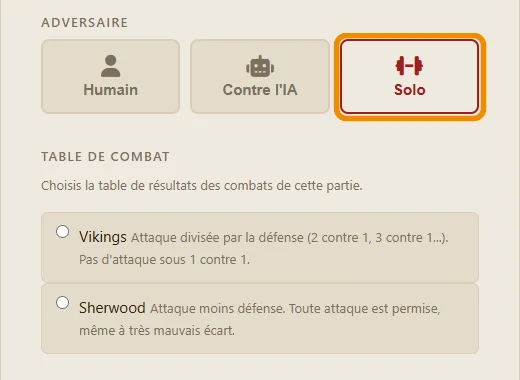
Go to the Play page, then click Create a new game. Choose the scenario, the deployment and the melee table, then click Solo (framed in orange). There is no side and no time per turn to choose: you have both sides, and all the time you want.
2. Play both sides
With manual deployment, you first place one side's counters, then the other's. Then each side plays its turn in turn: shooting, movement, combat. When you click End Combat Phase, the page reloads and the other side plays, still by you. The banner under the title always shows which side is playing.

3. What changes compared with other games
- No replay: you have just played both sides, you have already seen everything.
- No time limit per turn, and no emails: nobody is waiting.
- No effect on your rating or your reputation: winning or losing against yourself does not count.
Solo is ideal before a first game against another player: you see how each side starts, where the good cover for archers is, and how combats go with the chosen table.